 Integrations
Your scanner sends. We file it.
And your software hears about it. Studies arrive from whatever you already run, without anyone carrying a USB stick or typing a patient’s name. Included on both plans.
15 days free · 250 GB per seat · no card
BigMind Medical is not a diagnostic device. It keeps, files and shares images for review; a clinician reads every image.
# Send a study. Patient and study come from the DICOM tags.
curl -X POST https://bigmind2.genie9.com/api/v1/dicom/studies \
  -H "Authorization: Bearer $BIGMIND_KEY" \
  -F files=@IM0001.dcm -F files=@IM0002.dcm

# Get the patient's link. A retry with the same key returns the same link.
curl -X POST https://bigmind2.genie9.com/api/v1/dicom/studies/$STUDY/share \
  -H "Authorization: Bearer $BIGMIND_KEY" \
  -H "Idempotency-Key: visit-0142" \
  -H "Content-Type: application/json" \
  -d '{"expiresInDays": 30}'

# No public address for webhooks? Poll for what changed.
curl "https://bigmind2.genie9.com/api/v1/dicom/studies?since=2026-11-06T09:00:00Z" \
  -H "Authorization: Bearer $BIGMIND_KEY"
Ways in
Four ways in. Pick the one that fits.
- C-STORE from the scannerThe console sends to the DICOM receiver on a clinic Windows PC, like any DICOM destination.
- The folder it saves toThe agent backs up the folder and files every image it finds by patient.
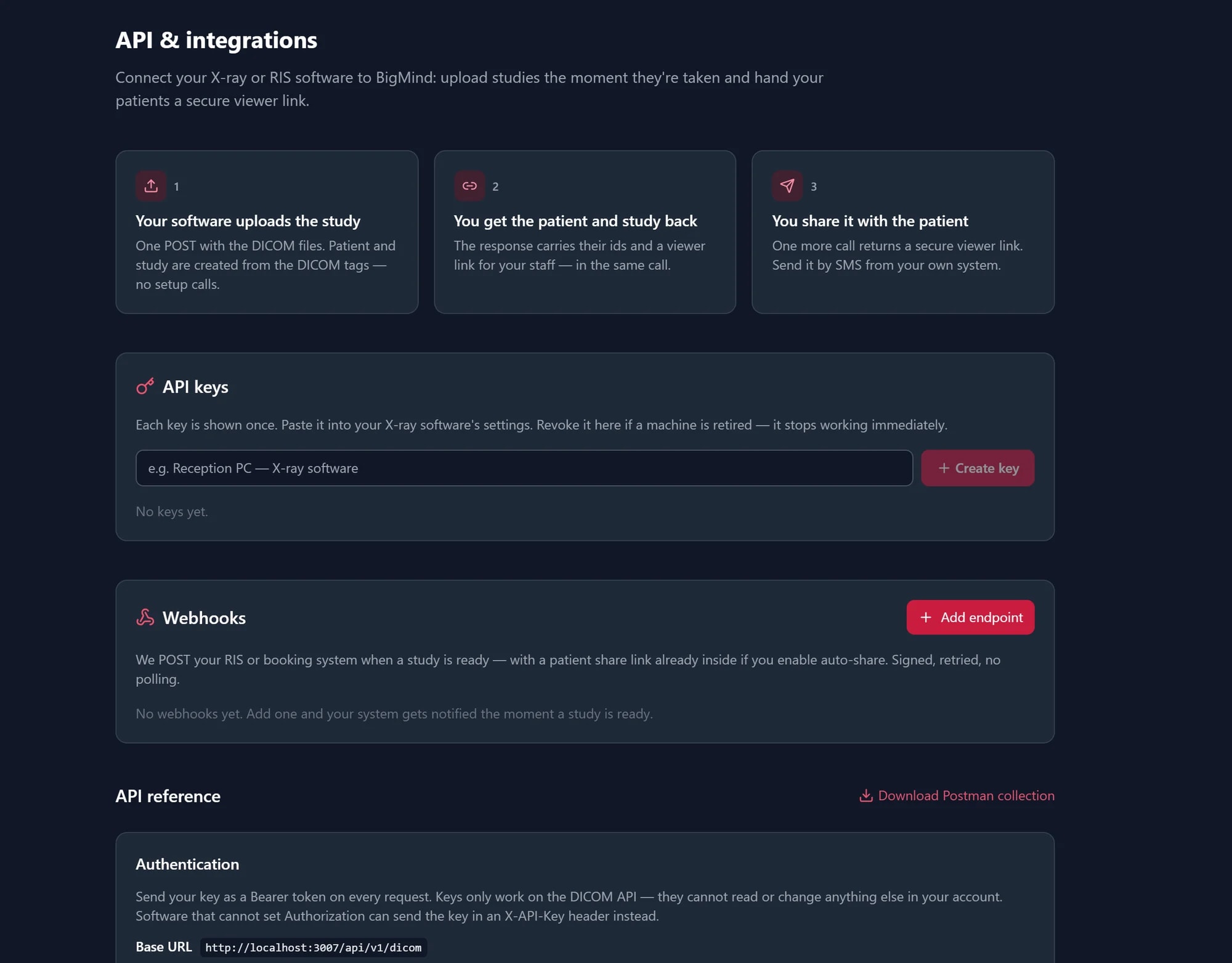
- REST APIPost the files; get back the patient, the study and a viewer link.
- Command-line toolbmdicom for Windows: upload a folder, watch a folder, share. No developer needed.
How it runs
From the console to the patient, untouched.
- 1KeyMake an API keyOwners and admins make keys in the app. A key is shown once and can be revoked at any time.
- 2SendSend the studyOne POST, one command, or the scanner pushes it over C-STORE.
- 3FileWe file itTags are read on arrival and the study lands under the right patient.
- 4LinkHand over the linkAsk for it in the next call, or let a webhook deliver it.
Built for the software clinics actually run.
- Safe to retry: matched on the instance UID, no duplicates
- Up to 100 files and 1 GB per request
- A key reaches the DICOM API only, nothing else in the account
- Find studies by your own accession number
- Fix a mistyped name in place; every change audited
- Documented error codes and a Postman collection
After it lands
Your systems stay in step.
- WebhooksWe call your system when a study is ready, when it grows, and when a link is made. Signed and retried.
- Or pollNo public address? Ask for every study that changed since your last call, oldest first.
- DICOMweb, read-onlyQIDO-RS search and WADO-RS retrieval for desktop viewers and AI services, with the same key.
- Links you can manageList a study’s links, see which still open, and stop one from code.
- Back out, byte for byteDownload any file exactly as it arrived, or send studies to your PACS with bmdicom.
- Open from your EHRA link in your EHR or RIS opens the patient’s study in the viewer (IHE Invoke Image Display).
Said plainly
What is not built.
Query and retrieve (C-FIND, C-MOVE)
The receiver stores what is sent to it; it does not answer queries.
Modality worklist (MWL)
We do not hold your schedule. The accession number your RIS assigns does flow through and can be searched.
DICOMweb writes (STOW-RS)
Studies come in through the API’s upload, the agent, bmdicom or C-STORE. DICOMweb is read-only.
The receiver on Mac or Linux
The DICOM receiver and bmdicom run on Windows only, today.
The receiver as a Windows service
It runs while it is started. After the PC restarts, someone starts it again.
A C-STORE endpoint in the cloud
DICOM networking has no real authentication, so the receiver is deliberately a gateway on your own network.
FAQ
Questions from IT and integrators
Can our X-ray or CT console send straight to BigMind?
Yes, with the DICOM receiver that comes with the BigMind agent for Windows. Make a DICOM API key, start the receiver on a PC in the clinic, and add that PC on the console as another DICOM destination: its address, port 11112 and AE title BMDICOM. The console’s connection test (C-ECHO) works, and each study is stored as it was sent. The receiver runs while it is started, so use a PC that stays on.
Which way in should we use?
If your software already knows about the study, use the API. If you have no developer, let the agent watch the folder the scanner saves to, or run the command-line tool. If studies should never touch a person or a folder, point the scanner at the DICOM receiver.
Can a desktop viewer or an AI service read our studies?
Yes, read-only, over DICOMweb (QIDO-RS search, WADO-RS retrieve) with the clinic’s API key. Viewers such as Weasis or 3D Slicer work this way. Every study a key reads appears in the clinic’s audit log.
How do studies get back out to a PACS?
Download them as the original DICOM files, through the viewer or the API, or send them over C-STORE to any destination on your network with bmdicom, the command-line tool. There is no one-click “restore into your PACS” button.
What happens if a request fails halfway?
Retry it. Uploads are matched on the DICOM instance UID, so a resend answers “already stored” instead of making a duplicate, and a share retried with the same Idempotency-Key returns the same link, even across servers.
Is any of this an extra charge?
No. The API, the C-STORE receiver, DICOMweb, webhooks and the command-line tool are part of both plans, $25 and $39 per user a month.
Connect a scanner in the trial.
Make a key, start the receiver on a Windows PC, point a console at it, and watch the patient appear. 15 days free, no card.