Cloud Desktop · Recovery Tier 3 · ~30–60 min · NEW
Boot any backup as a Windows VM in ~30–60 min.
Boot any backup as a metered Windows VM in the cloud — pay only while it runs.
- Backup → EBS volume → AMI → running EC2, automatically
- Admin password set offline — RDP straight in
- Test recoveries and run forensics without touching production
- Keep working while replacement hardware ships
- Pay per hour — first 60 minutes free
Why it's different
Most “cloud restore” restores files. We boot the entire machine.
Veeam Direct Restore to AWS is close — but you need to be on Veeam Backup & Replication, with a Windows Server license, with their AWS plug-in configured. Druva CloudRanger restores to a different orchestration model. Most other “cloud DR” products restore files into a new VM — not your VM.
Cloud Desktop boots your actual backup as an actual Windows VM, with your installed software, your drivers, your domain join, your apps. RDP-ready in ~30–60 min from a cold backup. With a backup that's never been booted before.
How it works
Click. Wait ~30–60 min. RDP.
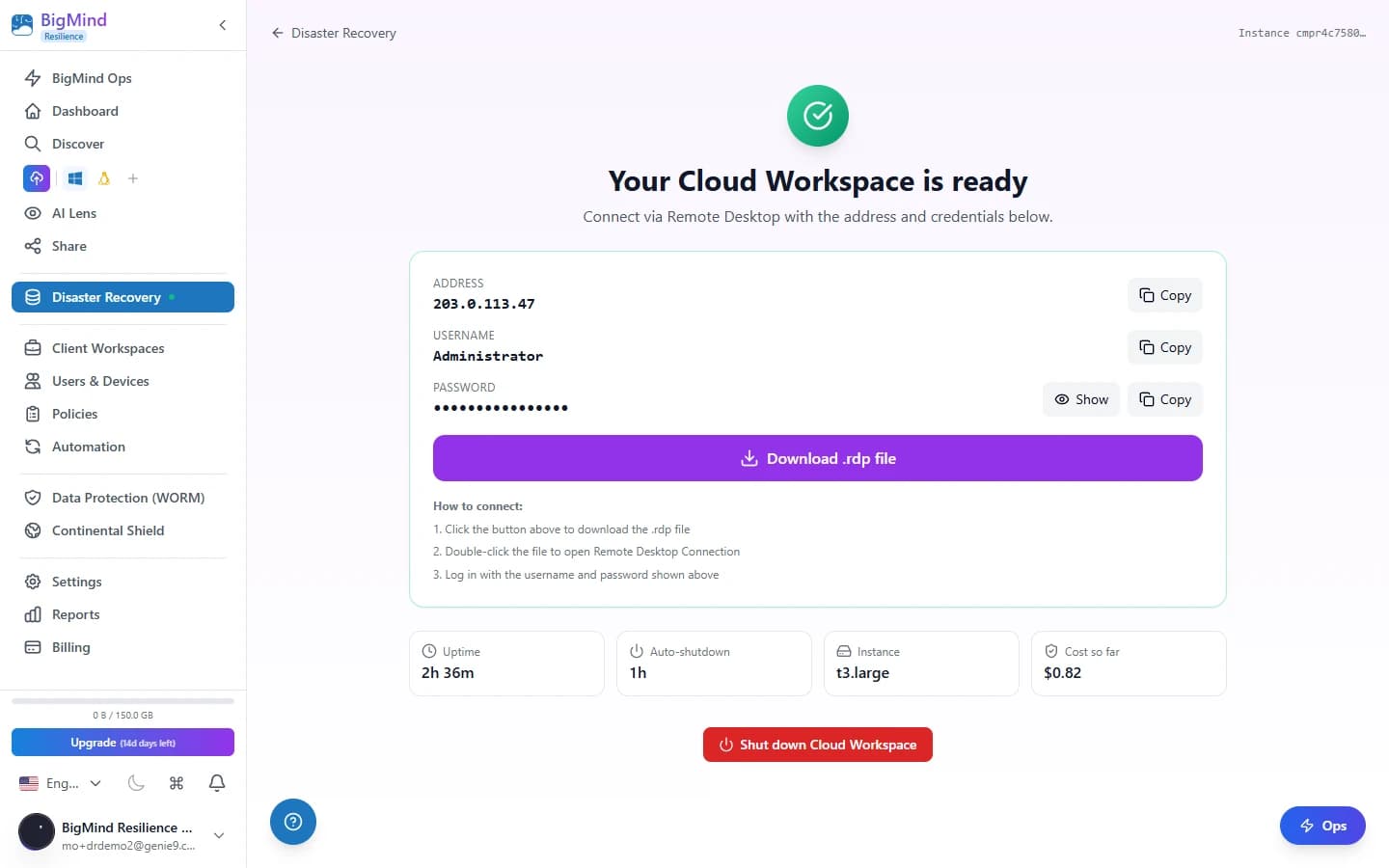
Pick a backup point, and we assemble the chunks into an EBS volume, register an AMI with DISM driver injection, launch the EC2, set the admin password offline, and hand you a .rdp file.
Assemble → Register AMI → Launch EC2 → RDP — one click kicks off the whole flow.
Click "Launch Cloud Desktop"
Pick a backup point in Recovery Shield. Pick instance size (we recommend based on source machine specs).
We assemble the chunks
A bastion EC2 fetches your backup chunks from cloud storage, reassembles them into a virtual disk, attaches as EBS.
Register AMI + launch EC2
Driver injection via DISM if the source had different hardware. ENA / xenvbd drivers added if missing.
Admin password offline + .rdp
Local admin password set offline (no Sysprep, no domain dependency). Download .rdp, double-click, you're in.
Use cases
Four ways teams already use it.
Test recoveries before disaster
Boot last night's backup, verify it works, screenshot for the audit log, shut down. The first 60 minutes are free.
Forensic investigation
Ransomware-tainted machine. Boot the suspect backup as a Cloud Desktop in AWS — off your production network — to investigate without re-infecting it.
Bridge while replacement HW arrives
Server died Wednesday. Replacement ships Monday. Boot Cloud Desktop, capped at $3–$6/day of bridging, business continues.
Compliance audit demo
Auditor wants to see a recovery, not a logfile. Boot a cold backup in ~30–60 min, then $0.20–$0.40/hr (first 60 min free, capped $3–$6/day) while they look.
Supported sources
Production-ready compatibility.
| Source OS | Cloud Desktop | Notes |
|---|---|---|
| Windows 11 Pro x64 + UEFI/GPT | ✓ | Production-validated |
| Windows 10 Pro x64 + UEFI/GPT | ✓ | Production-validated |
| Windows Server 2019 / 2022 | ✓ | Production-validated |
| BitLocker-encrypted source | ✓ | Recovery key prompt at boot |
| MBR / Legacy BIOS source | ✓ | Auto-converted to GPT/UEFI |
| Different hardware (chipset / NIC) | ✓ | DISM driver injection |
| Linux (Ubuntu / Debian / RHEL) | Q3 2026 | Roadmapped |
Pricing
$0.20–$0.40 per hour. First 60 min free. 8-hour auto-shutdown.
Per-hour
$0.20–$0.40/hr
Standard 4 GB / Comfort 8 GB · first 60 min free · capped $3–$6/day
Storage held
$0.10/GB/mo
Assembled image while not running
Auto-shutdown
8 hours
Configurable. Prevents accidental bills.
Tier credits
| DR-Only | — (not included) |
| Standard | 50 credits |
| Pro | 200 credits + larger instance sizes |
| Enterprise | Custom |
vs Alternatives
Why we built our own instead of pointing to Veeam Direct Restore.
| BigMind Cloud Desktop | Veeam Direct Restore | Druva CloudRanger | Datto Inverse Chain | |
|---|---|---|---|---|
| Source product | BigMind | Veeam B&R + Win Server license | Druva Phoenix | Datto SIRIS appliance |
| Time to RDP | ~5 min warm · ~30–60 min cold | Warm standby | Cloud VM | Appliance failover |
| Driver injection | Built-in DISM | Manual / Sysprep | Limited | Built-in |
| Cost model | $0.20–$0.40/hr (first 60 min free, capped $3–$6/day) | AWS instance + Veeam licensing | $0.10/GB transfer + EC2 | Subscription only |
| Cross-hardware boot | ✓ | partial | partial | ✓ |
FAQ
Frequently asked questions
How long does the launch actually take?+
~30–60 min (cold boot) for a typical 100GB Win11 backup — chunk reassembly and AMI registration take the bulk of the time. Always-Ready VM keeps an image warm so the same machine is RDP-ready in ~5 minutes. Larger images (500GB+) take longer. We show progress live.
What if my source machine had BitLocker?+
We prompt for the recovery key at first boot. Stored encrypted in BigMind; auto-injected into the cloud instance.
What happens when the 8-hour auto-shutdown fires?+
The EC2 instance stops (not terminates). The assembled EBS stays attached. You can resume in seconds. After 7 days idle, we email you and offer to terminate to save storage cost.
Can I extend the shutdown window?+
Yes — 1, 4, 8, 24, 72 hours, or "no auto-shutdown" for Enterprise. Default is 8 to prevent accidental bills.
Where does Cloud Desktop run?+
In AWS, reachable over RDP from your launch IP — separate from your production network. By default it has internet egress for software updates.
Test your recovery before disaster does.
Start a 14-day free trial. Cloud Desktop credits included on Standard and Pro.